Key takeaways
|

The best way to insult an email marketer is to call their emails spam. No one wants their hard work to be lumped into malicious sending behavior!
Protecting customers by identifying malicious emails is a constantly evolving process for email service providers (ESPs), as these bad actors continue to refine their tactics. Spam filters today have become so sophisticated that it’s rare an email can slip through an ESP’s defenses.
But in the process, ESPs may be netting more than just malicious emails. One in seven legitimate emails fail to reach the inbox, according to Validity’s 2026 Deliverability Benchmarks Report. And global spam placement rates almost doubled in the past year.
Ah, email deliverability, if only you were easy. The average global inbox placement rate is 87.2% with 6.1% of emails landing in the spam folder and 6.6% missing. In this post, we’ll cover why emails land in the spam folder instead of the inbox—and a few ways to troubleshoot your deliverability if you find a high percentage of your messages stuck in spam-land.
Table of contents
- Why do emails go to spam?
- A non-exhaustive checklist of why your marketing emails go to spam
- 8 steps to prevent emails from going to the spam filter
- Stuck in the spam folder? Here’s how to get out
- Find out why your emails go to spam with Validity
Why do emails go to spam?
Spam filters are there to catch scammers, not keep good senders from reaching the inbox. However, sometimes us healthy senders do get flagged and filtered into spam for a few different reasons.
You see, every email you send goes through a maze of deliverability obstacles before it reaches its destination. Three factors influence whether or not someone receives your email in the inbox:
- Infrastructure: Your identification and authentication records
- Domain reputation: How mailbox providers (MBPs) view your sending domain and IP addresses
- Content: What your message contains and how your subscriber has reacted to it in the past
If you’re struggling to solve the latest deliverability mystery for your email marketing program, you’re not alone.
Reach the inbox—not the spam folder
70% of emails show at least one spam-related issue that could keep them from the inbox. Don’t let your email be one of them. Learn more.

A non-exhaustive list of why your marketing emails are going to spam
Check this list first, then read on for how to fix them.
| Reason | Why it might impact deliverability | What to do about it |
|---|---|---|
| Email authentication protocols are not set correctly. | Authentication protocols communicate to MBPs that the email coming in is from a legitimate sender. Most major MBPs require authentication protocols to be in place for bulk senders. | Check DKIM, SPF, and DMARC records to ensure all are correctly set up. You can also implement BIMI which displays your brand logo in the inbox when you send an email. |
| Email send volume and cadence is too high or too unpredictable. | It looks suspicious to MBPs to have sudden spikes of activity. | Normalize your email send cadence and segment your list. Consider a full warm-up process when you know a change in volume is upcoming. |
| Spam complaints—your subscribers are marking your email as spam. | MBPs filter based on user behavior and preferences. If enough subscribers mark you as spam, that’s where your emails will live. | Make it easier for subscribers to unsubscribe. An unsubscribe is much better for your reputation than a spam complaint. |
| Your content “looks” spammy to an MBP. | If your email matches common scammer traits like poor formatting, phishing, or HTML, they are more likely to filter you into the spam folder. | Test and preview your emails ahead of time with Litmus. |
| You’re sending emails to inactive, fake, closed, or email addresses that have been repurposed into spam traps. | Poor email list hygiene will destroy your sender reputation. You could even end up on a blocklist. | Use double opt-in to ensure each new subscriber actually wants your emails. Regularly verify your email list and don’t buy lists from third parties. |
| Email engagement is low. | Lower engagement = lower sender reputation = more likely to go to spam. | Send targeted, relevant emails your subscribers actually want to receive. |
8 steps to prevent emails from going to spam
If you’re struggling with emails landing in the spam folder, here’s a more detailed look at what to check about your email marketing program:
1. Implement proper email authentication infrastructure
Even if you’ve already authenticated your email program, start here. Email authentication basically tells inbox providers that you are who you say you are.
You have four different authentication methods available—we recommend using all three:
- Sender Policy Framework (SPF): SPF allows a domain owner to indicate multiple IP addresses or domains that can send mail on their behalf via a DNS TXT entry. This way, mailbox providers know that if it’s sent from your company’s domain or IP address, that it’s from you.
- DomainKeys Identified Mail (DKIM): DKIM allows your organization to claim responsibility for your email as part of the authentication process by matching a public and private key, like a digital signature.
- Domain Message Authentication and Reporting Conformance (DMARC): DMARC protects a domain from being used in phishing and spoofing attempts by defining how receiving inbox providers should handle messages that fail an authentication check.
- BONUS: Brand Indicators for Message Identification (BIMI): BIMI allows you to display a sender logo alongside your messages in the inbox after completing authentication.
If you haven’t authenticated your emails, Gmail, Microsoft, and Yahoo’s bulk sender requirements mean you’re guaranteed to land in their spam folders. Their first requirement? Using these security protocols to verify your identity.
For each one of these authentication methods, make sure they’re set up correctly and that each record is aligned.
2. Watch your email cadence and frequency
What makes email marketing work as a channel is that it’s not interruptive. It’s not the in-your-face billboards, ads, or pop-ups people love to hate. Your subscribers chose to receive emails from you—which is great! Treat that permission with respect and take a hard look at your email marketing cadence. Are you sending too many emails?
There are two sides to email cadence with deliverability. The first is email volume, which refers to the overall number of emails that you send. A sharp increase in volume is going to raise some flags for MBPs.
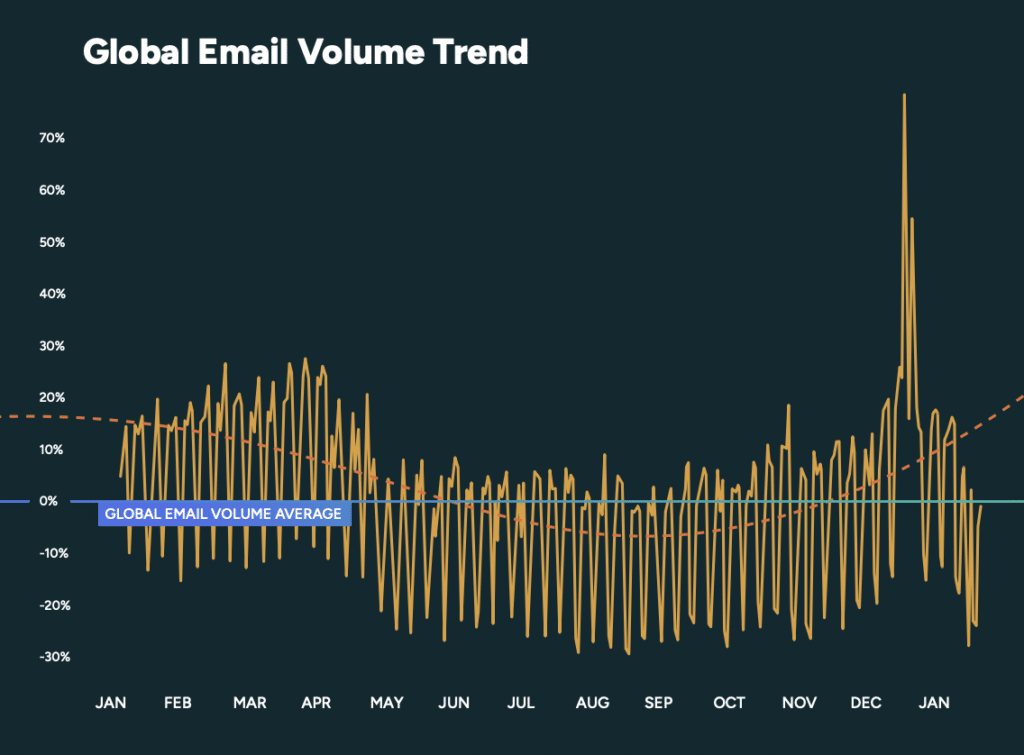
That means leading up to a big promotion spike (like Black Friday/Cyber Monday, as shown above) you’ll need to raise your send volume slowly.
But beyond a large volume jump like that, it’s also about matching the needs of your subscribers with your business tactics. It’s one thing to heavily promote a big sale or a once-a-year event, but if you make a habit of it, your subscribers will just tune out, which is even worse. “We get lots of complaints, and it’s about email overload. What we often see is almost a type of bombing, and [subscribers] get fatigued,” said Microsoft’s Principal PM Architect Ross Adams.
When in doubt, ask your unengaged subscribers what they want to see as a separate email campaign directing them to your preferences center. Here’s an example of ours, which outlines both our regular newsletters and one-off campaigns that we send out to our subscribers.
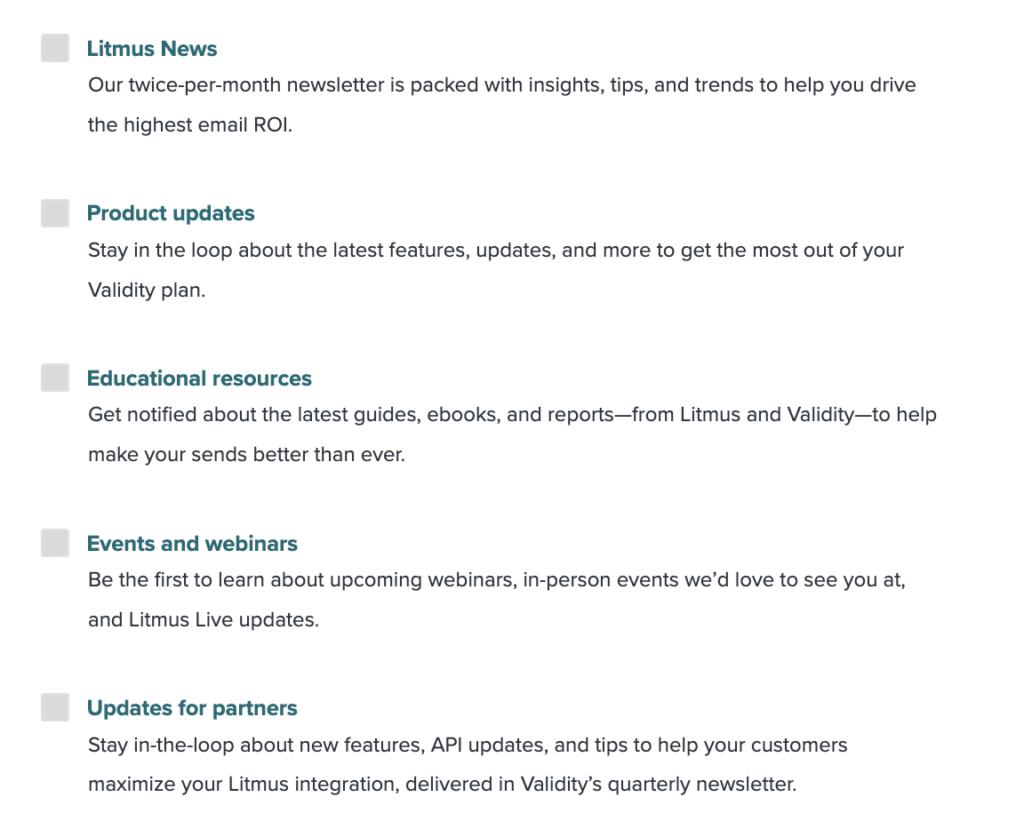
Giving your subscribers control over what kinds of emails they receive can help set expectations and prevent future spam complaints. Sometimes stakeholders have an expectation that you need to be sending constantly, but if you’re not getting engagement—or continually struggling with your deliverability, maybe cool it for a minute on your cadence.
3. Manage spam complaints
Everyone loves to worry about unsubscribes, but it’s spam complaints that matter more for your deliverability. Yet, when Validity asked attendees to their State of Email Live event about their spam complaint rate—19% didn’t know.
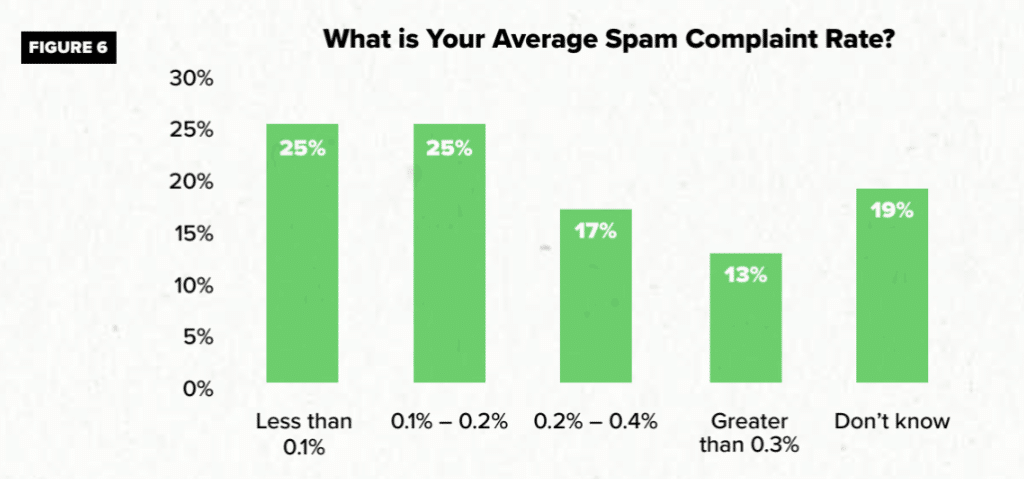
This is a key deliverability metric to know if you’re trying to troubleshoot your inbox placement. To comply with Gmail, Microsoft, and Yahoo’s bulk sender requirements, for example, you must maintain a spam complaint rate of 0.3%. Clea Moore, Principal Product Manager at Yahoo, told us that senders should view these requirements not as a mere checklist but as a holistic improvement strategy for the subscriber and sender requirements. Even though the requirement is at 0.3% for spam complaints, for example, she recommends closer to 0.1%.
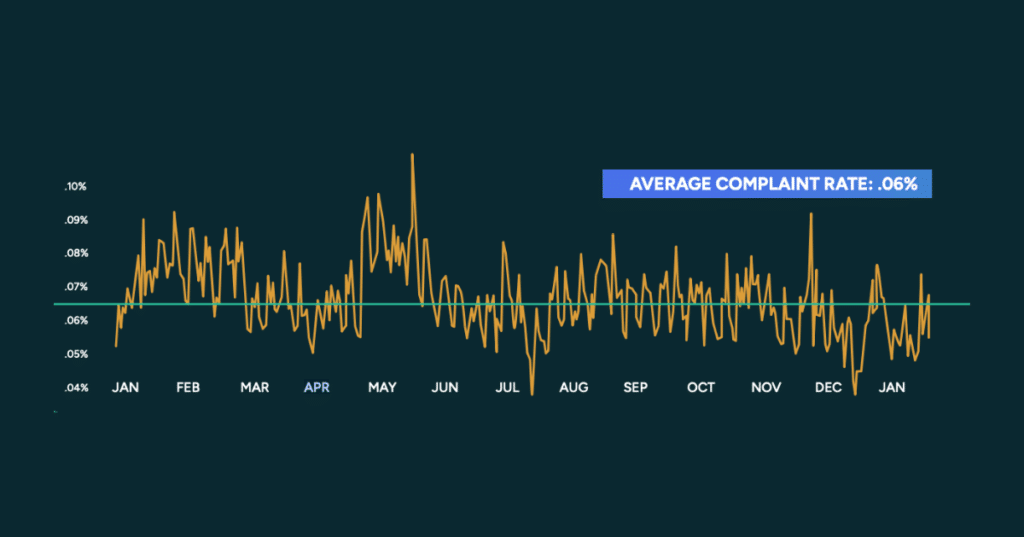
To keep your spam complaints low, you need to understand why a subscriber hits that button in the first place. Someone could mark you as spam because they:
- Can’t find the unsubscribe button so they click mark as spam instead (more on why this is important below!)
- Didn’t actually subscribe in the first place because you bought an email list, scraped the web for email addresses for people who visited your website, or automatically opted-in a customer at checkout. (Pleeeeease don’t do this, we beg you!)
- Think the email “looks like spam.” This includes bait-and-switch subject lines, using FWD: or RE: in weird ways, or generally trying to “hack” email marketing or be overly clever when it’s just confusing for your subscriber.
All this to say: Never mess with your subscribers and only email the people who actually opt-in to your list. Not only is this illegal in certain countries, it’s super annoying. Once you’ve lost brand trust, it can be difficult (or impossible) to earn it back.
Unlock 2026 inbox benchmarks now
Download Validity’s 2026 Email Deliverability Benchmark Report and learn how your inbox placement compares before your next send.
4. Make it easy for subscribers to say goodbye
Gmail and Yahoo’s bulk sender requirements mean if you fail to include a one-click unsubscribe option in your emails, they’re automatically going to the spam folder. (Not to mention, marketing laws from around the world.)
Not a greyed-out link that’s impossible to see in your footer.
Not a “reply to this email to be removed from this list.
And DEFINITELY not “forgetting” to include one altogether.
Email marketers love to freak out over unsubscribe metrics, but trust us, it’s much worse to be marked as spam instead.
5. Fix your formatting
There’s no one way for an email to “look” like spam, but broken images, funky formatting, and typos definitely don’t help make you look legit.
Some spam filters automatically check unexpected language such as misspellings and nonsensical words, as well as excessive inline markup tags, characters in layout, and other markers of messy code. If you’re using AI to help you draft copy, create images, or code your emails, double- or triple-check them before they go out.
That’s why having a poor email testing strategy puts your email program at risk. Without adequate testing, you could be sending broken emails that lead to negative experiences, damaging trust, and ultimately, harming the relationship you have with your subscribers. This wastes money and time for everyone.
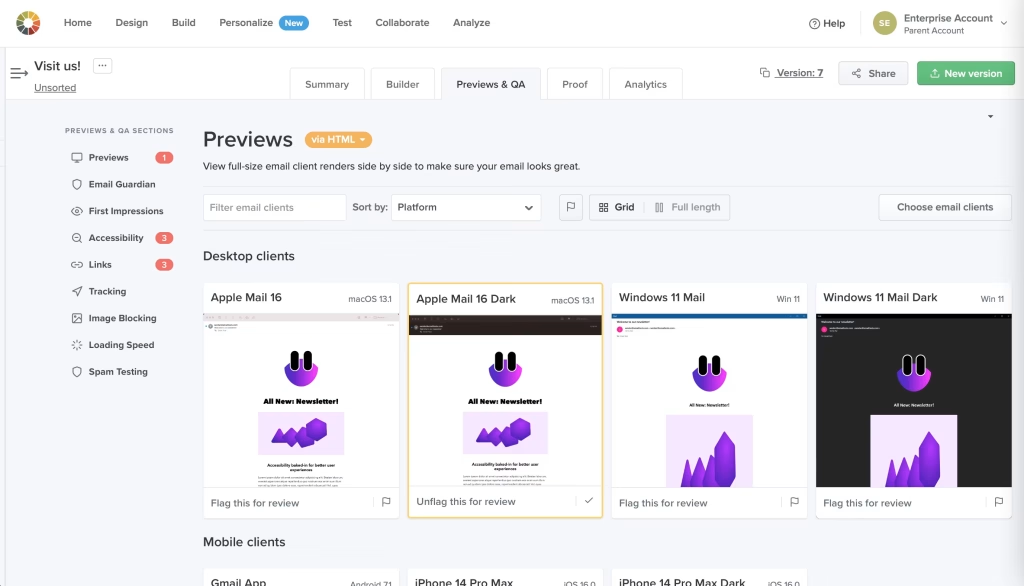
We’ve all sent out an email with a typo in it. But if you’re sending emails riddled with errors or that are difficult to read because of a formatting issue, make sure you’re checking your emails thoroughly before you click send. (If you need a little help, we’ve got a whole library of pre-tested free email marketing templates you can use.)
6. Clean up your email listand usesmart segmentation
Poor email list hygiene is another common reason you may be landing in the spam folder by accident. As B2B marketers, we often run into this—anytime someone leaves a company, what was once a solid lead becomes a hard bounce.
25% of email marketers surveyed for the State of Email Report 2025 say segmentation is their most effective personalization strategy. To clean up your email list:
- Filter out common typos (like gmial.com or yaho.com). Then, filter out any email addresses that have hard bounced and all of your unsubscribes. These should go on your “do not email” suppression list.
- Then, look at your soft bounces, which happen when an inbox is temporarily full or not working. If you’ve got more than 3 soft bounces, put those addresses on the suppression list, too.
- Finally, look at your overall engagement. We’ll talk more about segmentation in a minute, but remove anyone on your email list that hasn’t engaged in more than 90 days with a single email (opens, clicks, responses, or otherwise) We call these inactive subscribers, and these are the group of people most likely to hurt your deliverability.
When it comes to spam filters, it’s more about user behavior and engagement than the nuts and bolts. If you’ve already checked over your authentication protocols and other deliverability metrics, it’s time to think more deeply about your engagement.
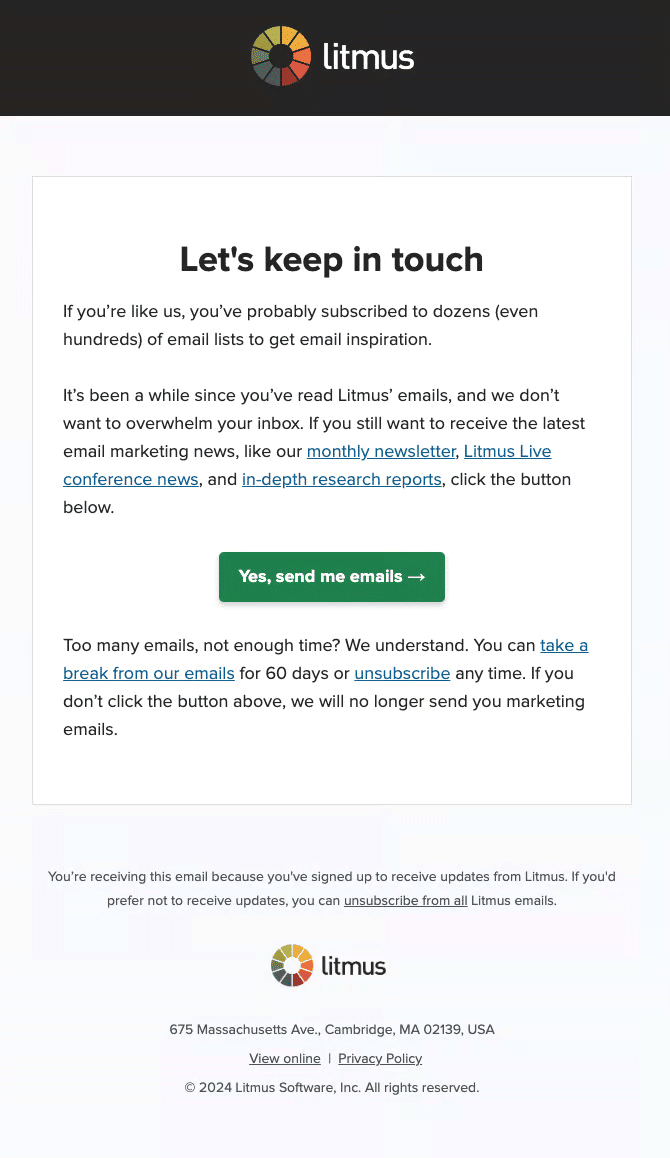
A great place to start if you’re finding a lack of engagement is with a re-engagement campaign for those inactive subscribers. We typically send one after 60 days of no engagement for our subscribers, giving them a chance to fine-tune their emails before suspending them from our list.
If this all seems daunting, Validity Engage, our AI-powered email platform, helps you clean, monitor, and maintain your marketing data. It also regularly verifies your list and makes sure all new email addresses added are real, working addresses—no typos or spam traps here!
7. Increase your overall email engagement
The reason deliverability feels like such a black box is that much of how a mailbox provider determines your inbox placement comes down to user behavior—those opens, clicks, and read time on your emails. And that, as any email geek knows, is one of the hardest things to fix.
In addition to the segmentation strategy we described above, personalization is one of the best ways to increase your engagement.
Email marketing is such a personal channel that your subscribers don’t just respond to personalization, they expect it. 71% of consumers expect companies to deliver personalized experiences, according to McKinsey. Make sure it’s working correctly, first—nothing like seeing the wrong name in the subject line to make it look like spam—but also that it actually feels personalized.
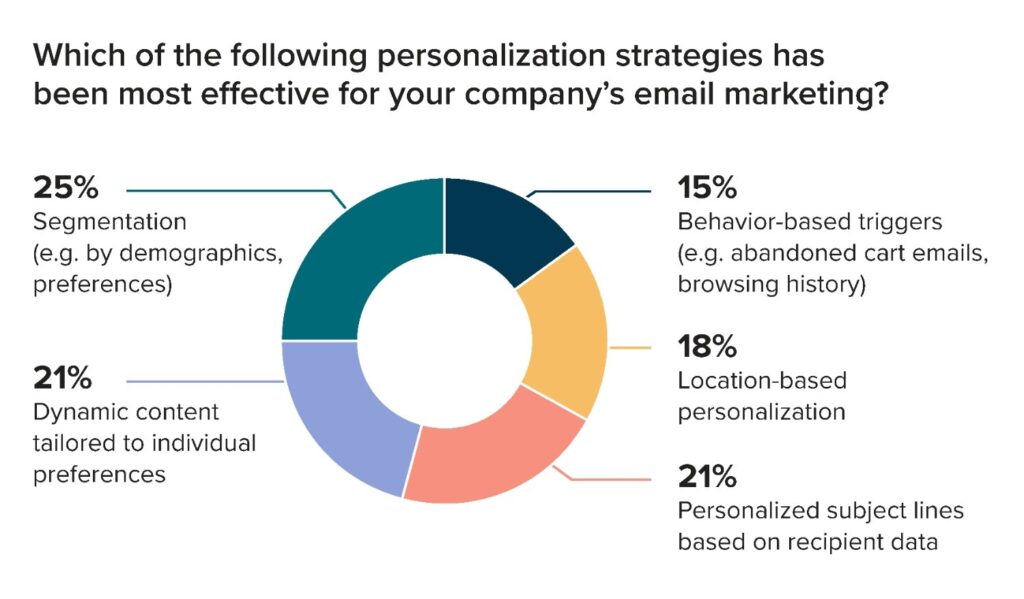
Yes, it’s more work to produce multiple emails for the same campaign—but the payoff is worth it. That means it’s not about knowing your subscribers’ first name, location, or company name, but about tailoring an email for their interests and needs.
Personalization isn’t about adding someone’s first name into an email campaign with the right merge tag. Personalization is about interests, behavior, and challenges. This is your relationship-building opportunity. Use that zero-party data through forms, surveys, interactive content, or preference centers to build your personalization strategy. Whatever data you choose to collect, make sure to use it—the more personalized your emails, the better they’ll perform.
It’s engagement, more than the content itself, that really matters when it comes to deliverability. If you’re struggling with the spam filter, it may be time to take a look at your email list and what kind of engagement you’re seeing…and how you can better personalize the emails you’re sending so they’re relevant, timely, and interesting to your subscribers.
Get email insights from marketers worldwide
Dive into the State of Email Reports for the latest trends, innovations, and best practices across the email marketing industry.

8. Send email content subscribers want to receive
For years, marketers worried over specific words and phrases in their subject lines or emails, or whether or not foreign languages would accidentally trip a spam filter. Luckily, MBPs are much more sophisticated today (pour one out for the time one of our emails got filtered for bringing sexy back!)
Today, it’s less about specific words you use and more what feels “spammy” to the recipient. That’s not to say you should suddenly pepper your emails with swears or racy references if it doesn’t fit your brand. But if probiotic brand Seed can lead with the subject line, “How’s your poop?” then you don’t have to agonize over using the word “discount.”
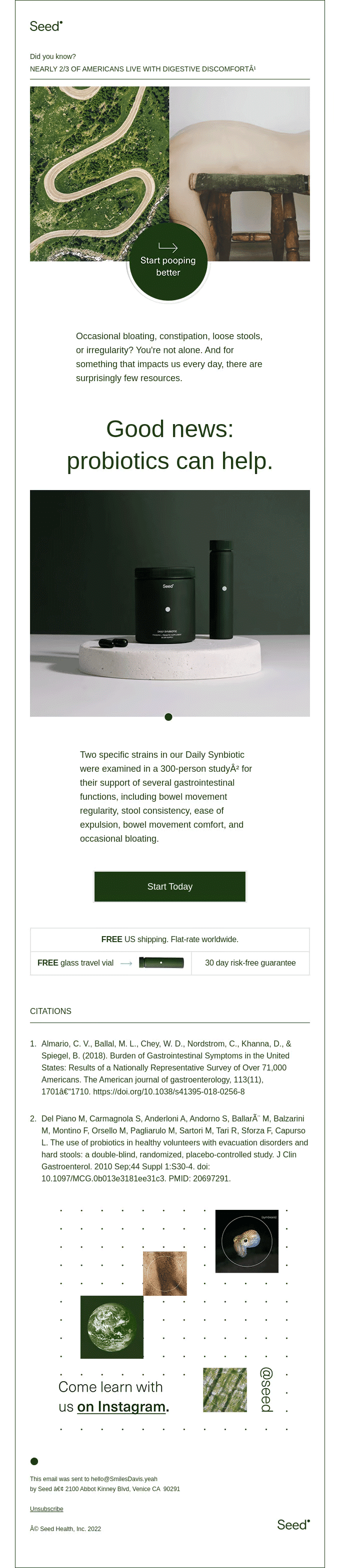
Poor content has less to do with the specific words or phrases you use and is rather about how you use them, and how your subscribers engage with your content (or don’t.) Focusing on great content means:
- Know your audience: What do your subscribers care about? Why did they subscribe? What issues are they facing? Use the answers to these questions to guide your email’s content.
- Content > Sales: Provide your subscribers with content that is of interest to them, rather than just hammering them with sales messages. Show your subscribers that you care about them and their needs and wants, rather than your own motives. This helps build brand trust (and funnily enough, more sales!).
- Think about the subscriber journey from start to finish: Build your emails and email campaigns thinking not just about that email, but how it fits into the context of your subscribers’ interaction with your brand. Where are they as they open the email, both emotionally (I wish X problem was solved) and physically (mobile vs. desktop). From that email, where do they go next? What’s the ultimate goal or action you’re driving?
Building the best content you can helps you boost engagement and positive subscriber behavior like clicks, opens, and our favorite, TINS (when subscribers rescue you from the spam folder by saying, “This is not spam.”) Keeping your content helpful, rather than salesy, is the best way to keep your content from being spammy.
Stuck in the spam folder? Here’s how to get out.
After you’ve spent so much time crafting the perfect email, it can all go to waste if your subscribers don’t get a chance to see it. If you’re worried about your deliverability, here is your action plan:
- Start with your analytics. Understand your inbox placement, spam complaints, unsubscribe rates, and overall engagement (opens, clicks, and read time) to get a sense of your current performance.
- If you’re unhappy with your performance, check your authentication protocols first. This is a do-not-pass-go, do-not-collect-$200 kind of situation.
- After that, check your email list hygiene to see how accurate your list is and implement the segmentation strategy we discussed above.
Those cover your biggest issues that could be impacting your deliverability. After that? Look holistically at your email marketing program. Not to give you an existential crisis, but are you sending emails your subscribers actually want to receive? Make sure your emails line up with their preferences, and if you haven’t personalized your emails, get to it.
Feeling overwhelmed? Validity’s Professional Services can help you get to the bottom of your situation. Send them a message and we can get all this sorted for you. 
Find out why your emails land in the spam folder
With so many different factors influencing your deliverability, it’s difficult to know what to fix when you’re struggling with the spam folder—at least it was before Validity Engage. Now you can easily uncover patterns in your email list, see engagement and inbox placement insights, and autonomously take action. Engage’s crucial insights and guidance helps you reach more people, increase engagement, and protect your email performance.
AI-powered email intelligence
Built on Validity’s vast data network, Validity Engage removes risk and boosts email performance—so you can produce exceptional results in less time.
The post Why Did My Email Go to Spam? Deliverability Questions, Answered appeared first on Litmus.
https://www.litmus.com/blog/how-your-content-could-trigger-the-spam-filter